

In any room bigger than a huddle space, one camera at the front puts remote participants at a disadvantage. People at the far end of the table look small. People along the sides appear in profile. A question from the back of a training room arrives as the back of someone’s head.

Adding cameras is the easy part. Deciding what remote participants actually see is harder.
Why More Cameras Don’t Always Mean Better Hybrid Meetings
Each new camera adds coverage, and it also adds problems a single camera never has. The most visible one is the same person appearing twice or more – once from the front, once in profile and sometimes in a third tile from across the table. Remote participants notice it at once.
Then there is the cutting. A system that switches every time the voice changes produces ping-pong cuts during cross-talk. It may also pick the camera that shows the speaker from the side, when another camera shows their face. Small differences between cameras in color, exposure and delay turn every switch into a visible jump. It is a question of who, or what, decides which picture goes out.
Three Ways to Manage Multi-Camera Meeting Rooms
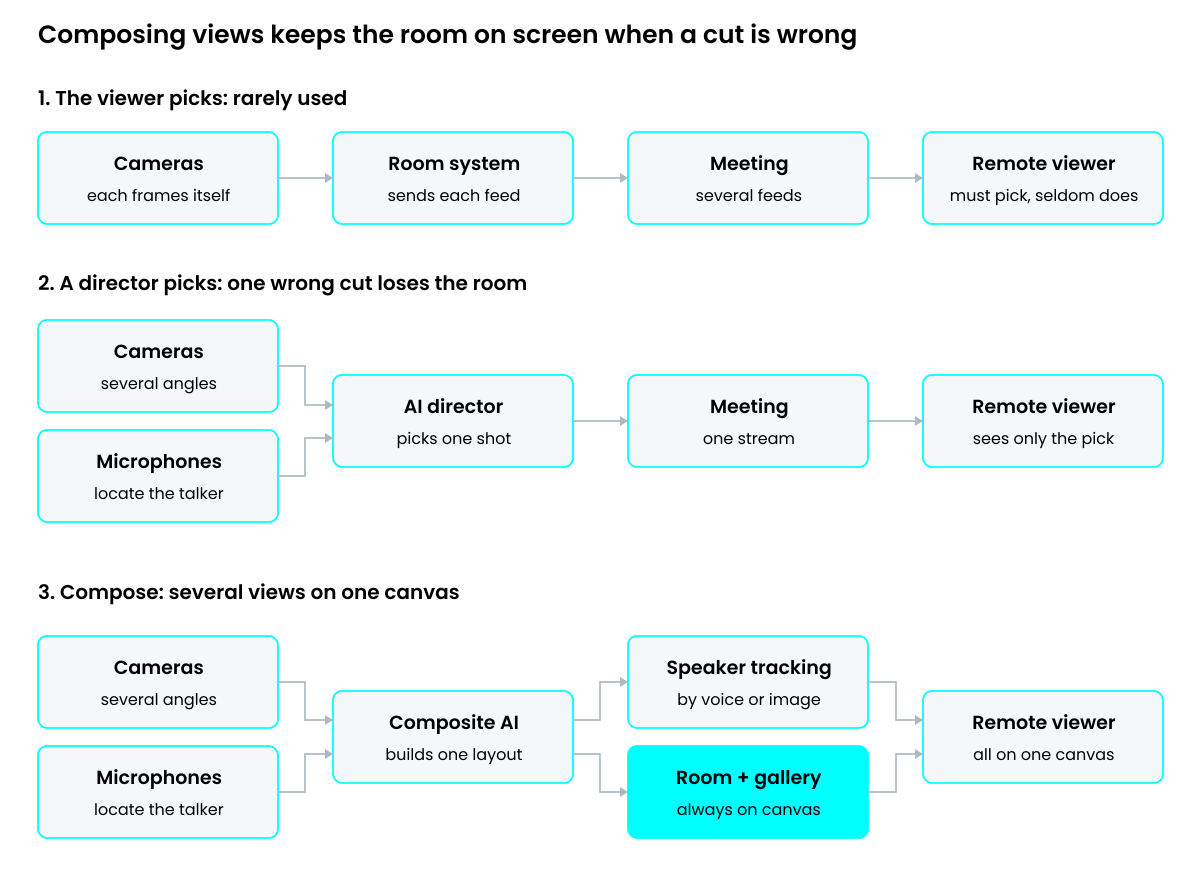
Let the viewer pick. Multiple camera view in Teams Rooms on Windows sends up to four camera feeds into the meeting, and remote participants choose which one to watch. In theory, this gives the viewer full control. In practice, it rarely gets used. People join a meeting to follow the discussion, not to direct it, so most stay with whichever view they started off with.
Let a director pick. An AI director combines what the cameras see with where the voices come from, and sends one produced stream. But a director with nothing else to fall back on has to be right every time, and in an unscripted conversation, it isn’t. It cuts to someone who just coughed, or lags behind a quick exchange. Each wrong call takes the whole room away from the remote viewer.
Compose several views on one canvas. This puts several streams side by side in one layout – a full-room view, a gallery of the people in the room and the active speaker. When the AI follows the speaker, the room view stays on screen, so an odd decision costs one tile rather than the whole picture.
What Multi-Camera Meetings Can Learn from Live Sports
A film director works from a script and knows who speaks next. A meeting has no script, which makes it much closer to a live football match than to a film set.
Live sports directors follow a simple rule for action they cannot predict: the wide-angle main camera stays on air while the ball is in play. Coverage opens on a wide shot and close-ups stay rare. The aim is a director that nobody notices.
Broadcast directors avoid split screen because it divides attention, but meeting audiences are different. Since the pandemic, a gallery of tiles is simply how a meeting looks, so showing the speaker next to the wider room follows the sports rule – always keep the wide view – in a familiar form.
How AudioCodes Composite AI Improves Multi-Camera Meetings
Composite AI on the AudioCodes RXV200 Android Intelligent AV Hub is built on that idea, combining several camera streams into a single layout. In its three-camera form, it shows a full-room view, a Smart Gallery and speaker tracking all at once. The RXVCam360 Video Conferencing Camera provides the gallery from the middle of the table, and the dual-lens RXVCam70 PTZ Camera provides the wide view and the PTZ close-up.
Within that layout, Composite AI follows the presenter by voice or by image. Speaker tracking moves with whoever is talking. Presenter mode stays with one chosen person, even when someone else in the room speaks. Focus Speakers shows the three last active speakers only.
Composite AI also handles the moment most meeting systems lose the presenter – content sharing. With Show Presenter on Content, the presenter appears on top of the shared slides, so remote participants see the person and the material together.
What’s Next for AI-Powered Multi-Camera Meeting Rooms?
At AudioCodes, we think the next step combines the two ideas – a match director who isn’t afraid of split screens and decides not only which shot to show, but how many.
A meeting almost always needs more than one view, but not every camera has something to add. A smarter director would drop the empty corner or the tile of someone silent for twenty minutes, and give the space to what matters. In a presentation, that means the presenter and the content – in a discussion, that means the people talking, with the room view kept small.
But ultimately, the future of multi-camera meeting rooms isn’t about cameras at all. It’s about intelligence that understands the conversation well enough to know what remote participants need to see. The less they have to think about the technology, the more they can contribute to the meeting.
FAQs
Multi-camera meeting rooms improve the hybrid meeting experience by capturing participants from different angles, making it easier for remote attendees to see speakers, follow discussions and understand what’s happening in the room. When combined with AI-powered video composition, multiple cameras can provide a more natural and inclusive experience without requiring participants to switch between views.
AI helps manage multiple camera feeds by identifying active speakers, tracking presenters and selecting the most relevant views. Advanced solutions such as AudioCodes Composite AI go further by combining room views, speaker tracking and participant galleries into a single layout, allowing remote attendees to follow conversations without losing sight of the wider meeting.
AudioCodes Composite AI is an intelligent multi-camera video capability available on the RXV200 Android Intelligent AV Hub. It combines feeds from compatible cameras, including the RXVCam360 Video Conferencing Camera and the RXVCam70 PTZ Camera, to display a full-room view, Smart Gallery and speaker tracking simultaneously. This helps deliver a more engaging Microsoft Teams Rooms experience without requiring remote participants to manage individual camera feeds.


