What's new in AudioCodes Generic SIP IP Phones and SIP Gateways devices?
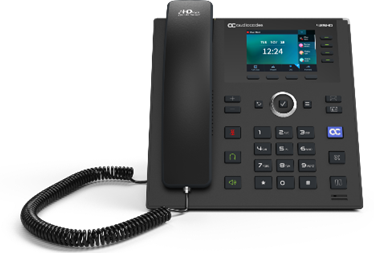
The 425HD is an advanced, mid-range business IP phone for office workers and common area users, featuring a large multi-lingual 3.5” color non-touch display and 8 programmable multi-function keys. The 445HD is a high-end IP phone with an integrated sidecar, providing additional programmable keys for enhanced functionality. The C450HD is a versatile IP phone with optional expansion, supporting advanced connectivity options and a sleek design. These devices ensure seamless and productive communication for various business environments.
Related Certificates:

Release Versions:

Want to be among the first to get the latest AudioCodes device releases?
Supported Models:
- 425HD - 425HD User's Manual
- 445HD - 445HD User's Manual
- C450HD - C450HD User's Manual
SIP Environment Compatibility Notes:
- Alianza Core (Metaswitch): This release is for Alianza Core (Metaswitch) environment.
- For all other environments, continue using 3.5.4.44.
- Zoom: We are finalizing a few additional adjustments for the Zoom environment. An updated version, 3.5.7 will be released by Zoom, expected within the coming several weeks.
Main Features In This Release:
(For detailed configuration instructions of each of the features, please refer to the version Release Notes).
What’s New – Release for Alianza Core (Metaswitch) only
IP Phones 400 series are compatible with Alianza Core (Metaswitch) Solution.
AudioCodes IP Phones 400 Series are fully interoperable with the Alianza Core (Metaswitch) solution and support essential VoIP functionalities required for service provider deployments.
This includes SIP-based call control, device provisioning, and standard telephony services, ensuring seamless operation within Metaswitch-based environments.
This interoperability enables service providers to deploy AudioCodes IP phones as fully compatible and reliable endpoints, supporting a consistent user experience.
For the list of supported features in this environment, please refer to the version Release Notes

Supported Models:
- 425HD - 425HD User's Manual
- 445HD - 445HD User's Manual
- C450HD - C450HD User's Manual
SIP Environment Compatibility Notes:
- Microsoft SIP Gateway: This version is under final review by Microsoft to replace the current GA release. While Microsoft certification is pending, AudioCodes has approved it for use. OVOC customers may obtain the firmware directly from AudioCodes to begin deployment immediately.
- Cisco Webex: Cisco approval is expected by February 2026. Until then, version 3.5.2.32 remains the officially supported release for Webex environments.
- Zoom: Version 3.5.4.44 is not released for Zoom. AudioCodes SIP phones 445HD and C450HD in Zoom environments should continue using version 3.5.1.89.
Main Features In This Release:
(For detailed configuration instructions of each of the features, please refer to the version Release Notes).
Reboot menu option moved from Admin menu to Settings menu
Reboot menu option moved from Admin menu to Settings menu to allow the non-administrative users to reboot the phone.
Exclude ‘feature code dialing’ from Call Log
Feature code dialing is a PBX mechanism used for special functions (e.g., follow me, Call
Forwarding, Do Not Disturb, etc.) rather than for regular call dialing.
Feature codes typically include identifiable prefixes and/or suffixes such as #123#, *678*, *#123456*#, or other administrator-defined patterns.
Cisco WebeX and Broadsoft Environment - Call Log Integration based on XSI protocol
The XSI Call Log enables users to view and manage detailed call history directly within the IP
Phone interface. This integrated functionality provides a centralized record of inbound,
outbound, and missed calls associated with the user's extension.
Support redundancy failback when DNS resolution of the SIP proxy server’s FQDN returns a
different IP address.
Added new function key type Speed_Dial_BLF
To allow presence per functional key
Ability to disable the presence SUBSCRIBE message
For Speed_Dial functional key type only
Resend SUBSCRIBE message if received 404 response
Ability to disable the presence SUBSCRIBE message
For Call Log lists
INVITE message configuration added
Conference call configuration for Vodafone environment
Special XSI configuration for Vodafone environment
Ability to disable/enable NTP queries for public NTP servers
Display caller ID from P-Asserted identity header instead of From header in incoming call
Firmware header download method for HTTP server to avoid downloading entire file if device version is the same as on the server
Ability to disable New Call Softkey in Incoming Call screen
Prevent SIP UNSUBSCRIBE on VoIP Reload upon failover/failback

Supported Models:
- 425HD - 425HD User's Manual
- 445HD - 445HD User's Manual
- C450HD - C450HD User's Manual
Key Notes:
- To enable connection of your IP phone to the Cisco Webex environment, please ensure it is updated to version 3.5.2.32. This build integrates Identrust trusted CA certificates, enhancing compatibility and security.
- Important: This version is only for Cisco Webex environments. For all other environments, continue using:
- 3.5.1.75 (general use)
- 3.5.1.75.5 (general use - specifically for 425HD)
About Cisco Webex Calling
Cisco Webex Calling is a secure, enterprise-grade cloud calling and collaboration solution optimized for businesses. It includes centralized administration and device management. AudioCodes IP Phones are fully interoperable with Cisco Webex Calling and support essential business calling capabilities.
Additional Resources:
- Deployment of AudioCodes devices: Cisco managed third-party device support on Webex Calling.
- Webex Center Help: Add users manually in Control Hub and Configure and manage Webex Calling devices.
Supported Models:
- 445HD - 445HD User's Manual
- C450HD - C450HD User's Manual
Key Notes:
- Important: This version is only for Zoom environment. For all other environments, continue using version 3.5.1.75.
Supported Models:
- 425HD - 425HD User's Manual
Key Notes:
- Due to several field-reported issues related to the 425HD model, AudioCodes is releasing an updated firmware version specifically for this model: 3.5.1.75.5.
- This version is based on the current release (3.5.1.75) and includes fixes for the following issues:
- IPPUC-11067 – [425HD] In certain cases, audio may be lost after prolonged idle time without rebooting the device.
- IPPUC-11113 – [425HD] Following specific calling scenarios, pressing the ‘Speaker’ hard key to initiate a call may result in a short beep, which is actually part of an endless busy tone. Rebooting the phone resolve the issue.
- IPPUC-11112 – [425HD] When the volume is lowered to its minimum during idle, pressing the ‘Speaker’ hard key produces no tone. Increasing the volume resolves the issue.